
WHERE: Davis, CA
WHEN: February-March 2019
ROLE: UX Designer (individual project)
TOOLS: InVision, Adobe Illustrator, Personas, Storyboarding, Paper wire-framing
Project Overview
In this personal project, I created a mobile design using UI UX design principles. I wanted to design an application that would help people find free public wifi sources because the lack of service and accessibility to wifi sources were struggles shared among many low-income and under-represented minority groups. I narrowed my target audience down to people working overseas away from their families because they are the group of people that would benefit most from solving the wifi accessibility problem. People working away from their families with limited data plans don’t have easy access to communication with their family. This app would bridge people working overseas with their families by showing all the nearest free wifi sources, available outlets, open hours, and quietness levels of each place. Everyone deserves a peaceful, private place to chat with their loved ones. Easier accessibility to public resources is possible through this App.
Problem Statement
People with limited data plans need easy access to public resourced wifi so they can spend more time connecting with their family and not worrying about constantly saving data.
Personas
“How Might We” …?
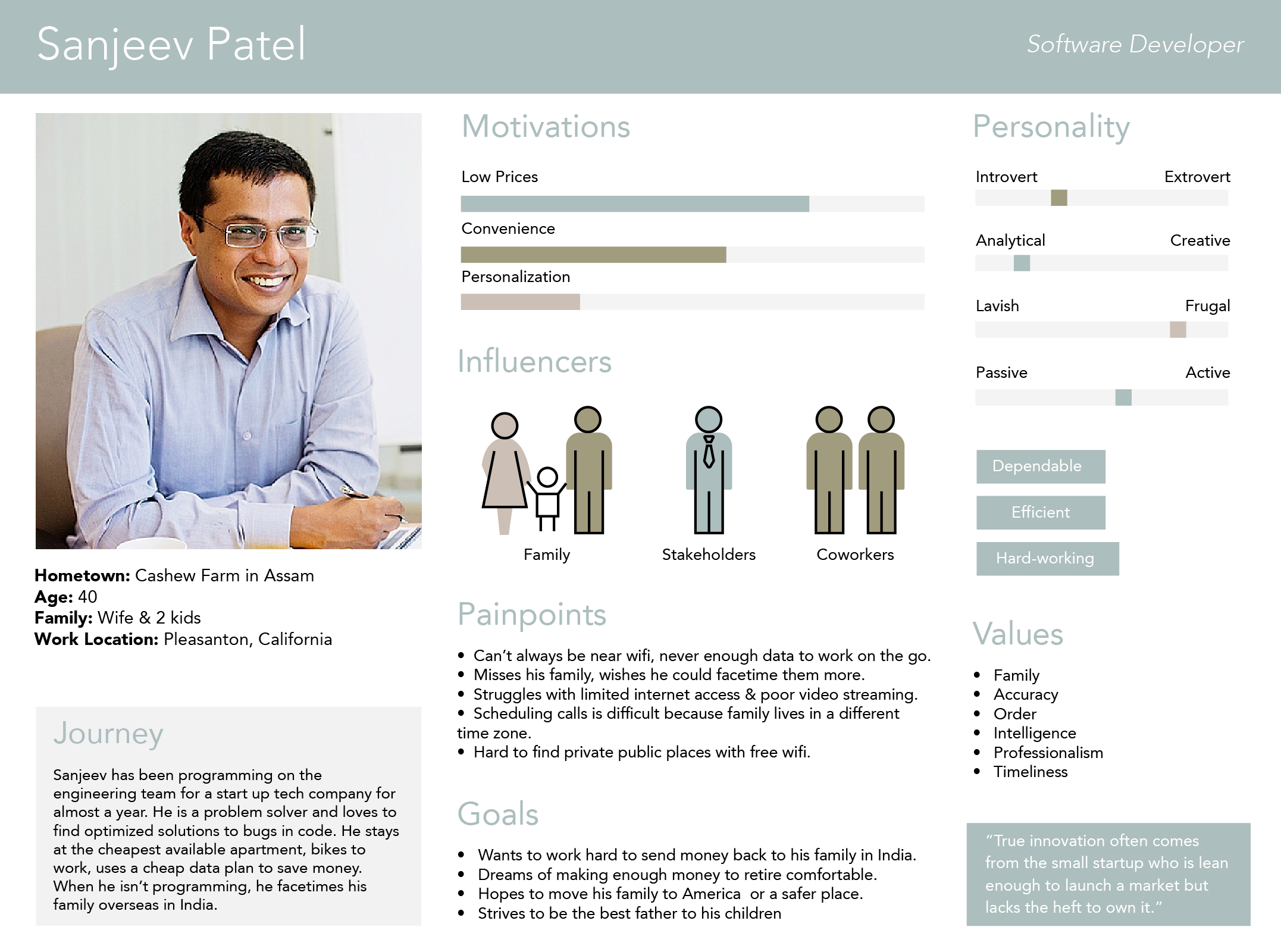
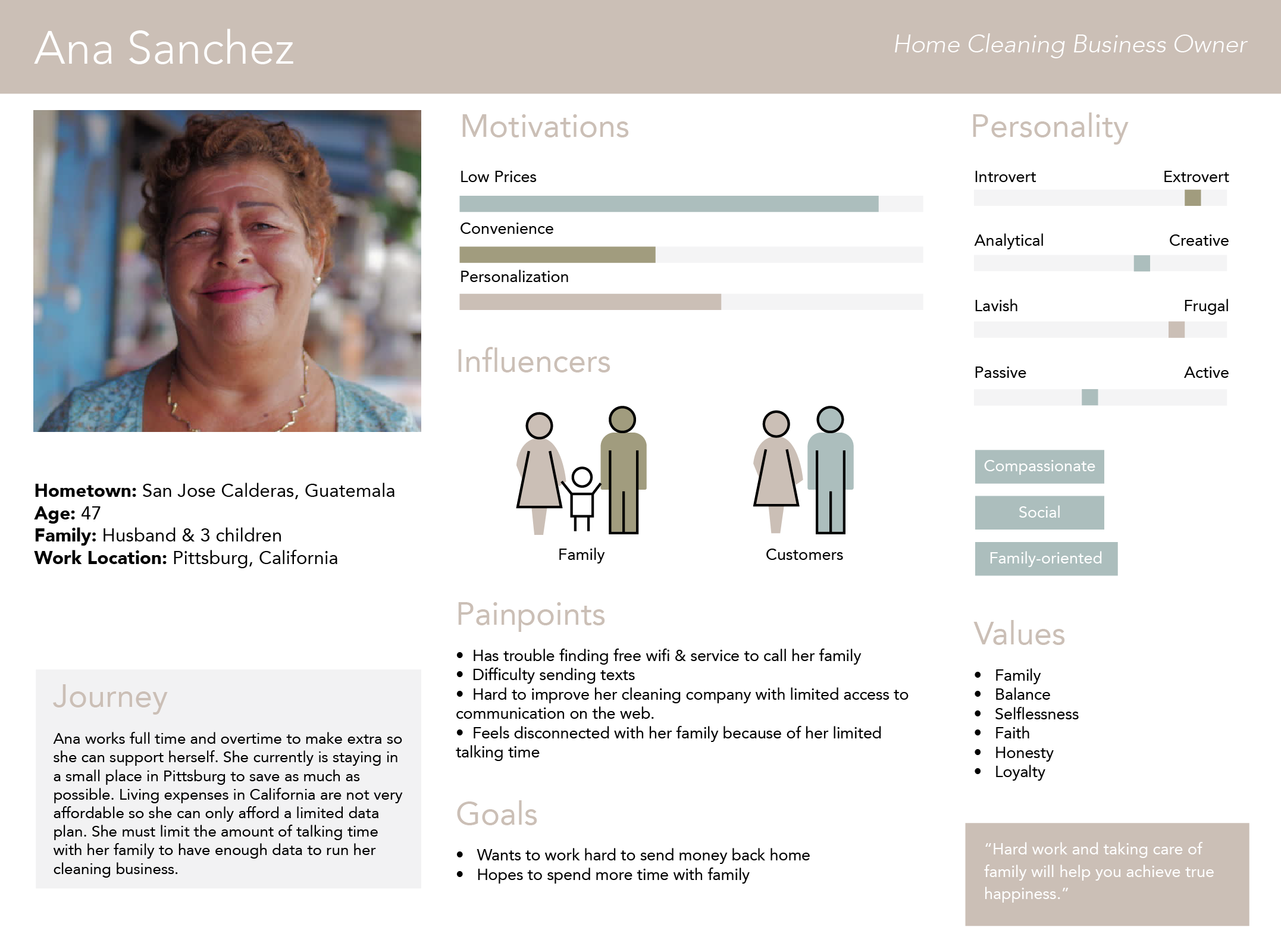
After taking a dive into my users’ lives and seeing what they have to go through, I began to think of how might we statements. I saw the problem for not only what it was but also how it really affected these people. By building this empathy through the creation of personas, I really started thinking about their pain points more concretely and writing “How Might We” statements. The HMW that really captured the essence of my users’ needs was:
How might we create a space that allows my user to communicate with their family remotely while staying in the constraints of their financial budget?
By answering my “How Might We” question, I began seeing feasible possibilities and forming a design synthesis.
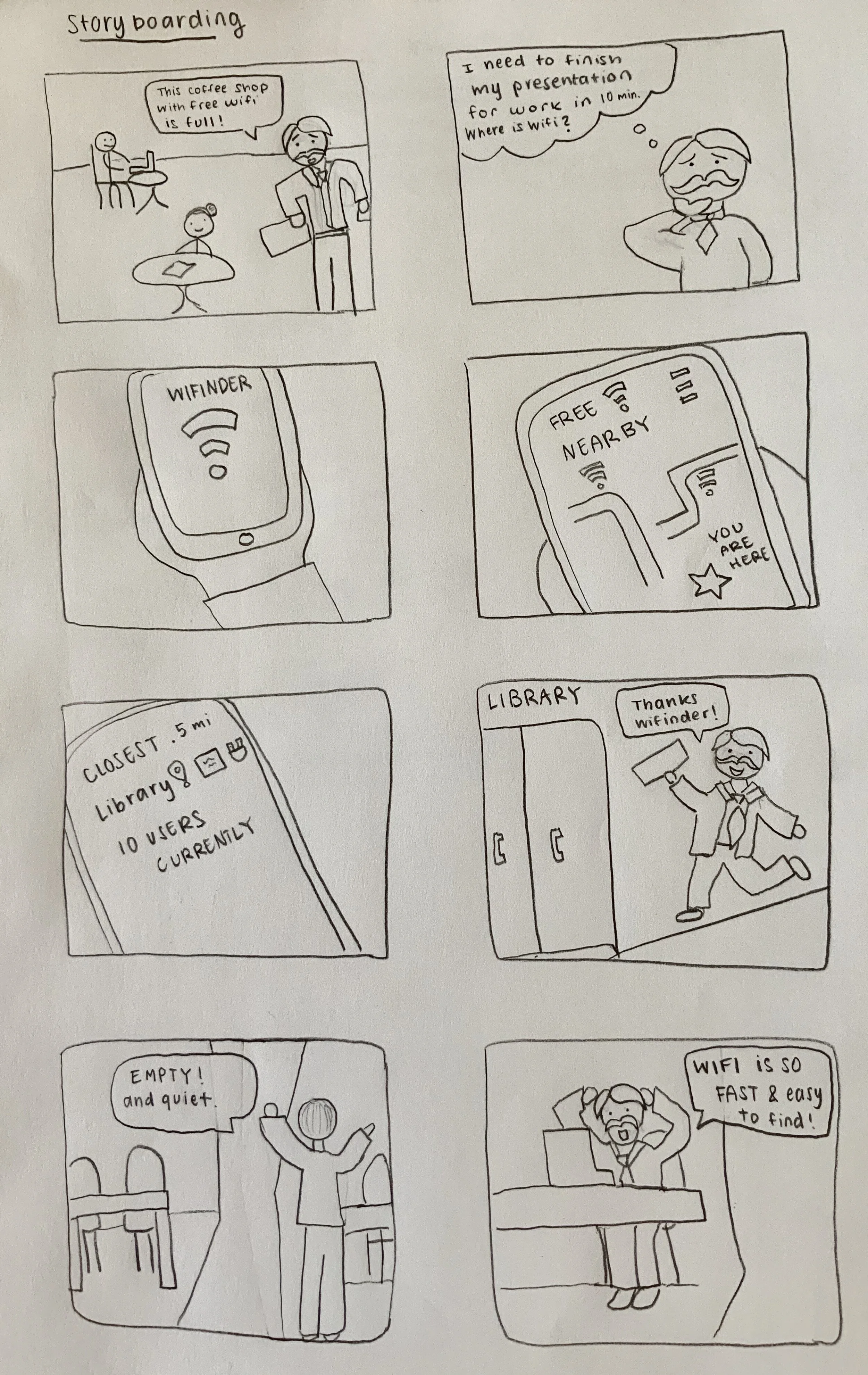
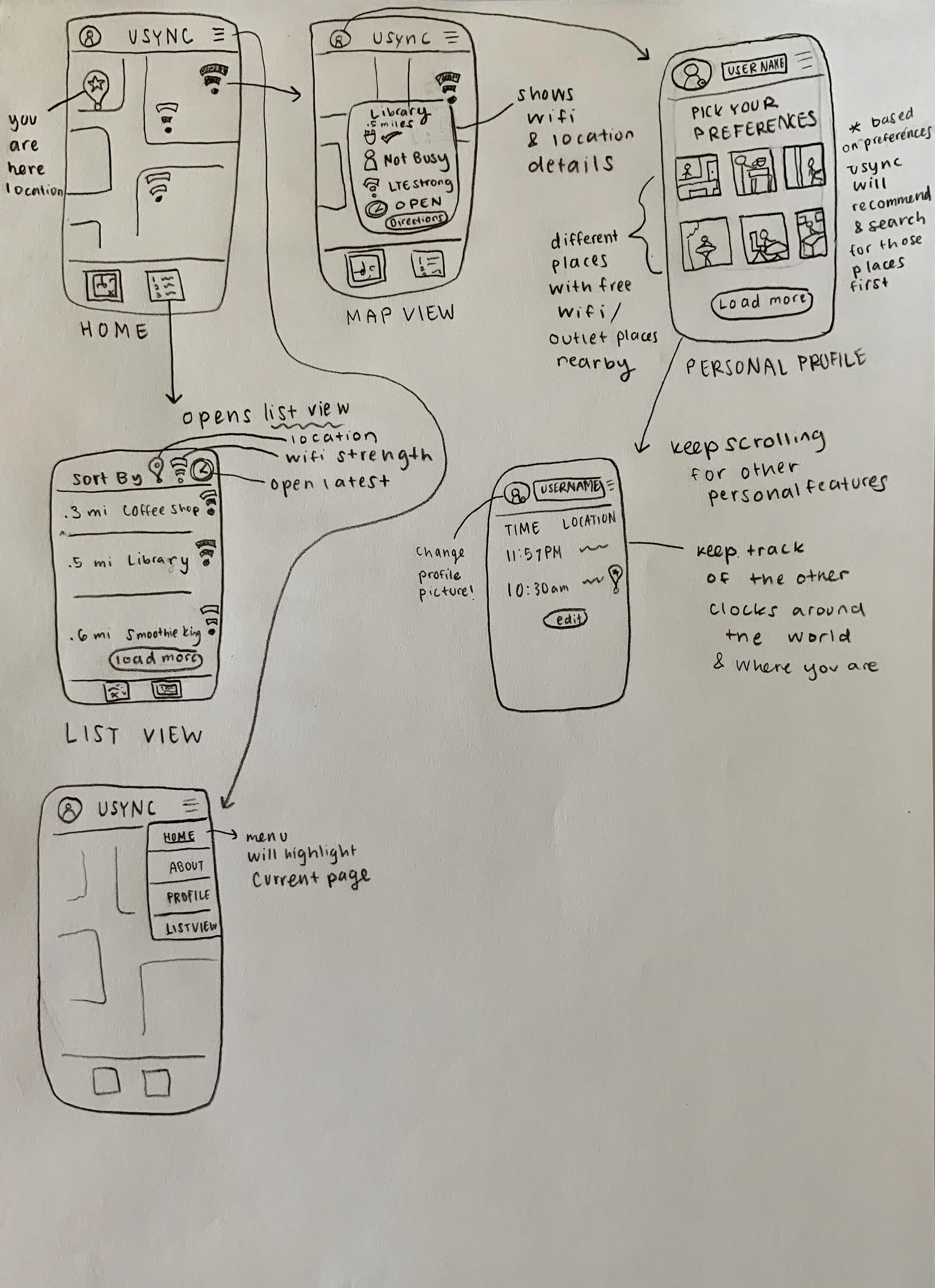
Preliminary Storyboarding/ Paper Wireframing
After understanding the users’ journey I was able to come up with design essentials:
Having a map that showed nearby wifi locations based on user’s location
Creating a toggle between map and list view
Having a place preference page
I chose these as must-have specifications because they were each specific pieces that satisfied my users’ needs and solved the main problem. The design essentials set the basis for creating an application that makes public wifi more accessible.
The way-finding interface had to be either a map or list of wifi locations because those information design displays were the most familiar to my audience. Why did I keep both displays as options? One of my personas was more analytical, therefore having information in a list view was more desirable. Whereas, my second persona who is more visual, preferred a more graphical interface with more icons. This pattern was also common among many map like interfaces.
To make the app more personable, I wanted to allow users create their own profile where they could have their personal place preferences. This feature would give users the option to pick the places they would be most comfortable to chat and relax in. The app would then display the preferred places first based on the users’ choices.
Concept Testing
Here was my first round of user feedback (6 participants):
Profile page needs to have the title smaller to give more visual hierarchy to the logo
Add more pages to create a longer task flow
Make things look more clickable
Add navigation menu to all pages so user can easily go back to where they were
Add Directions Page
Add About Page
Make sure information boxes are not cut off
Add more features to preference page
No consideration of time zones or localization
Post Testing Improvements
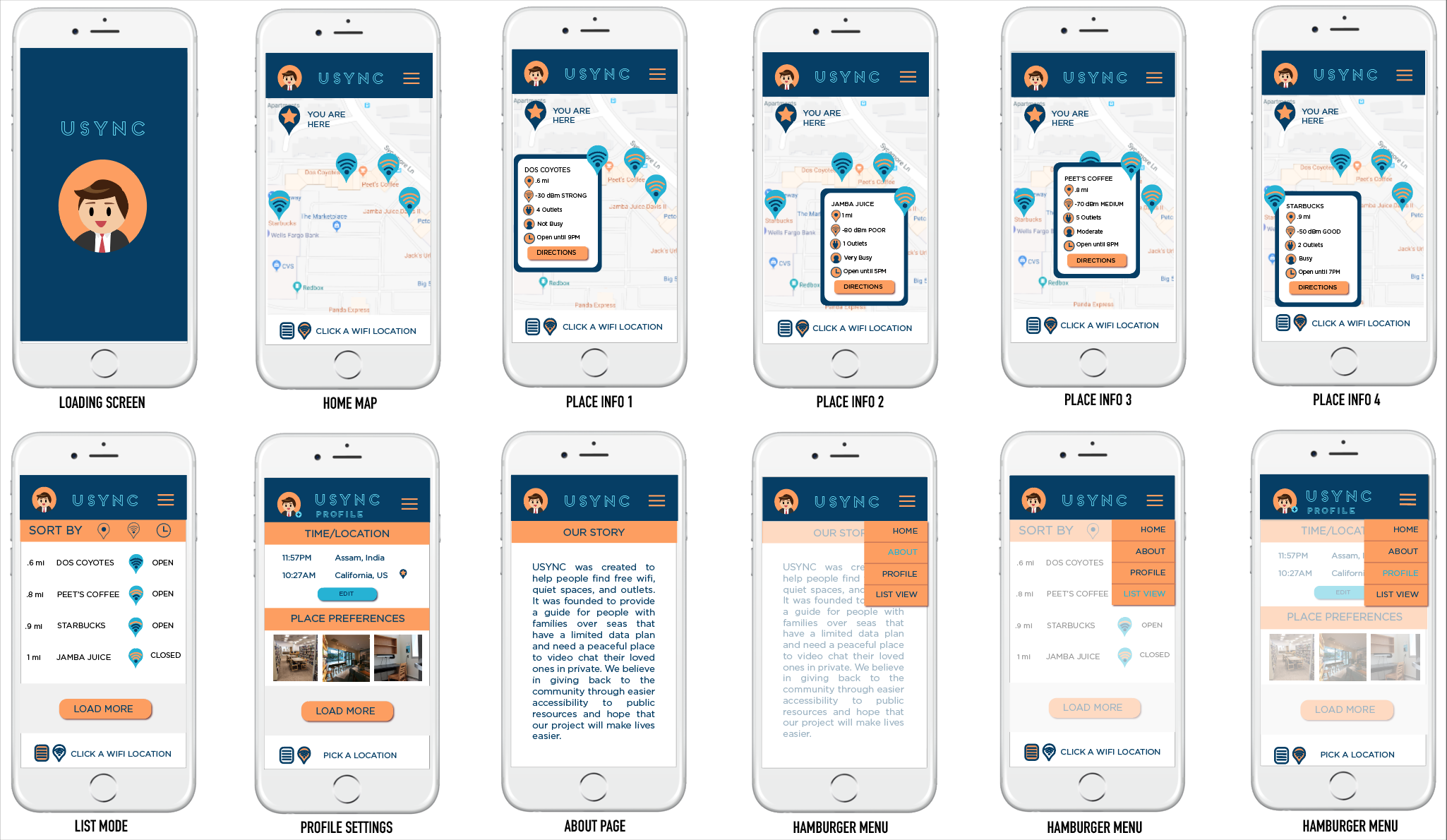
After receiving feedback, I was able to fix the visual hierarchy, eliminate items that seemed to be clickable, add missing flows, and add some features to make the application more personalized. I thought about how my users shared the same pain point of having their family be in a different time zones. To make their lives easier, I added a feature that displayed their current location time, their hometown time, and any other places they might want to keep track of. Additional information was also included in each wifi location: place name, miles away from user’s location, wifi strength, available outlets, busyness, open hours, and a directions button. I felt this information would be very useful because my users need a quiet place to talk with family and a strong internet connection for high quality video streaming.
Final InVision Prototype Link
https://projects.invisionapp.com/share/NTQML88MXJS#/screens/348058512_USYNC-01
Check out the final prototype!
What I learned:
- How to make a clickable prototype in inVision and use it on my phone ( Yes, this was one of my very first user experience projects but I still keep it because it was the project that make me realize UX design was the part of design that was most meaningful to me. I finally believed I could help people with my design skill set! Huge turning point for me and where I wanted my career to go)
- Visual hierarchy is extremely important when it comes to helping your users get to what is most important in their process of completing their task. By making the most used elements larger makes it easier to find and speeds up the process. Differentiating each part must be intentional to help guide the user and allow them to more easily complete their task.
- The more customized the design is, the more users feel the experience is made for them. You enjoy the product & experience more because you are part of the creation. You enjoy it more because you are the expert of your life and you know what you like.
- How important it is to see the users’ story and how they will be using the app start to finish. Flows and features should serve a purpose in creating an experience that understands what the users’ needs and actually helps alleviate critical pain points. Establishing user empathy in the beginning allows you to step in their shoes and paint an experience that feels intentionally drawn from their point of view and intuitive for that particular person.
Hopes and wishes:
I wish that someday, an app like this is built because I know it could help many people who can’t afford expensive data plans and want to be able to talk with their loved ones who are far away. I wish I could have done more usability testing with more people who fit specifically in with my user demographic, rather than other design students and faculty. However, I am happy with the way the final prototype turned out and really enjoyed designing for equity.